When India changed GST rates, most businesses updated their billing software within days — and their websites last. Fix every published price the same week: website pages, PDF price lists, WhatsApp catalogues, marketplace listings and printed rate cards. Then move prices onto one editable page on your site, so the next rate change is a 30-minute edit instead of a month of customer disputes.
In September 2025, India ran its biggest GST rate change since the tax launched. The 56th GST Council meeting collapsed the 5, 12, 18 and 28 percent slabs into a structure built mainly on 5 and 18 percent, plus a 40 percent rate for a short list of luxury and sin goods. The new rates took effect on 22 September 2025, and the government published a factsheet through PIB spelling out what moved where.
Over the months that followed, we kept running into the same gap while working on client sites and enquiries: the billing software was fine. The website was not. Owners updated Tally or their billing app within a week because their CA chased them. Nobody chased them about the pricing page on their own site, the PDF catalogue they last shared on WhatsApp during the previous festive season, or the price tiles in their WhatsApp catalogue. Those kept quoting the old slabs for months. A rate change on paper takes one afternoon; the real work is finding every place the old rate still sits.
This guide is that sweep, written for business owners across India — retailers, clinics, D2C brands, service firms — not for accountants. Where the numbers should go, in what order, what each fix costs, and the one structural change that makes the next rate change boring instead of expensive.
Why website prices go stale after a GST change
Your billing software has a rate master, a deadline, and an accountant reminding you about it. Your website has none of those. A price on a web page is not connected to anything — it does not throw an error when the GST rate behind it changes, and it does not remind anyone that it exists. It just sits there, correct the day it was written and wrong the day after the notification.
The mismatch only surfaces when a customer compares. Someone checks your site, walks in or messages you, and the invoice says something different. If the price went up, it reads as a bait-and-switch. If the price went down and you did not pass it on, it reads as quiet profiteering — and for pre-packaged goods, the government has generally expected the benefit of a rate cut to reach the consumer, which is why manufacturers spent September and October 2025 re-stickering MRP labels under Legal Metrology rules.
Neither conversation is one you want to have in front of other customers. And the awkward part: the owner usually has no idea which pages are stale, because they stopped looking at their own website months ago.
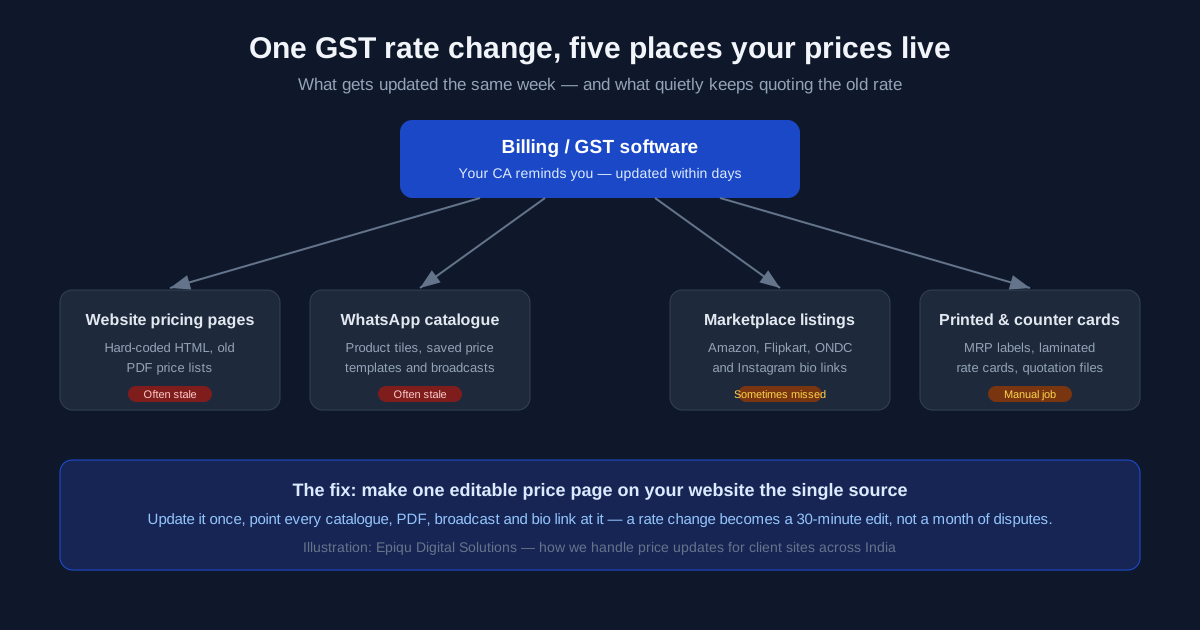
Where stale prices hide after a rate change
We have learned to check a fixed list, in this order. Billing is on here only as a sanity check — it is rarely the problem.
| Place the price lives | What goes stale | Who usually notices first |
|---|---|---|
| Website pricing or product pages | Hard-coded rates, "inclusive of 12% GST" notes, FAQ lines mentioning old slabs | A customer comparing site to invoice |
| PDF price lists and catalogues | Files linked from the site and shared on WhatsApp — often months old | A buyer quoting the PDF back at you |
| WhatsApp catalogue and templates | Product tile prices, saved price-list messages, scheduled broadcasts | The customer holding the screenshot |
| Marketplace listings | Amazon, Flipkart and ONDC tax fields that drive the buyer-visible total | The marketplace, or a buyer who cannot claim ITC |
| Printed and counter material | Laminated rate cards, MRP labels on unsold stock, quotation templates | A walk-in customer at the counter |
| Billing software rate master | HSN-to-rate mapping — almost always updated on time | Nobody. This one is the reference point |
Two rows deserve a flag. The PDF row is the one owners forget completely, because the file was "done" the day it was exported. And the quotation row: a rate change means every template saved on someone else's laptop is now wrong, and nobody thinks to update a Word file that lives outside the website.
The 45-minute price audit, step by step
- Start from the billing software. Confirm the rate master is correct for every HSN or SAC you sell — this is your source of truth for the whole sweep.
- Open your website and read every page that shows a price or a tax rate, including the FAQ. Search the site for "12%" and "28%" — the old slabs hide in sentences, not just price tags.
- Open every PDF linked from your site. Check the file date against 22 September 2025. Anything older needs regenerating, not editing.
- Open the WhatsApp Business catalogue and read every product tile. Update prices, then check saved templates and any scheduled broadcasts that quote a figure.
- Check marketplace tax fields if you sell on Amazon, Flipkart or ONDC — the declared rate drives the invoice the buyer receives.
- Walk the counter. Rate cards, menu boards, printed MRP stickers on unsold pre-packaged stock. Re-stickering rules for the transition window came through the Consumer Affairs ministry; confirm the mechanics with your CA.
- Do one mobile pass at the end. Read your own pricing page on a phone, the way customers actually see it.
Most businesses find two or three stale places on the first run. The count matters less than the habit — after a rate change, the sweep should start the same week, not when a customer complains.
Three ways to fix website pricing, and what each costs
Once the audit is done, you have three realistic routes. They differ in what you pay now versus what you pay every time the next notification lands.
| Route | How it works | Typical cost | Next rate change |
|---|---|---|---|
| One-time developer edit | A developer finds and fixes every hard-coded price and tax note across the site | Roughly ₹1,500–₹5,000 for a small static site, more with many pages — get a quote against your page count | Pay again. This is the route most businesses are on |
| Move to one editable price page | Prices consolidate into a single page or table the owner can edit without a developer | A few thousand rupees as part of an existing maintenance plan, or a small one-off build | 30–60 minutes, self-serve |
| Full CMS or catalogue build | The whole site moves to a system where prices, catalogue and content are all editable | Typically ₹15,000–₹50,000+ depending on the site — our website development cost guide for India breaks down the ranges | Minutes, and every other content update gets easier too |
The middle row is where most small businesses should land. You do not need a CMS to keep prices current — you need prices in one place instead of five. We have set this up for clients as a single price page that the PDF, the WhatsApp catalogue note and the bio link all point to, so there is exactly one number to correct. If you are already paying for maintenance, this is usually a small addition to the existing plan — our website maintenance cost guide for India covers what those plans typically include.
The third row makes sense when the site itself is the bottleneck. If updating anything on your site requires a developer ticket, that friction shows up in more than prices — stale hours, stale offers, stale photos. That is the same reasoning behind our Instagram shop vs own website comparison: the platform you do not control cannot be updated by you, and published prices you cannot edit are effectively someone else's.
Do not forget the WhatsApp side
For a lot of Indian businesses, WhatsApp carries more published prices than the website does. The catalogue tiles, the saved price-list template the sales person pastes twenty times a day, the broadcast that went out last festive season — all of these are prices the customer can screenshot.
Update them on the same day as the billing software, in this order: catalogue tiles first, because customers browse them unprompted; then saved templates, because they are quoted in live conversations; then any scheduled broadcast, which should be cancelled and rebuilt if it quotes the old rate. One more nuance from our work on WhatsApp ordering versus an online store: if your WhatsApp flow ends at a payment link, the link amount must match the catalogue price you just updated, or you have created a new dispute inside the fix for the old one.
A rate change is also one of the few genuinely good reasons to message your opted-in customers — "prices updated per the new GST rates, current list attached" reads as transparency, not spam. Send it only to people who opted in, and send it as a properly categorised message; a promotional blast at the old list can land as marketing and cost far more per message.
How we handle rate-change updates for clients
For sites we build and maintain, the routine is now fixed. Prices live on one page, tax notes live in one template, and every catalogue or PDF elsewhere on the internet is a pointer, not a copy. When the 2025 rate change hit, client updates were a same-day edit plus a WhatsApp catalogue check — no page-by-page archaeology.
Where we inherit a site that has prices scattered across five pages, the first job is the audit checklist above, and the second is consolidation. That order matters: fix the numbers first, because customers are seeing them today; fix the structure second, so this never has to happen twice. The thinking is the same one behind our dental foundation case study — design the maintenance around the least technical person who will do it.
If your pricing is still scattered and you would rather hand the sweep to someone, our web design services cover both the one-time fix and the consolidation, and we work with businesses across India — see our service locations for how delivery works remotely.
Common mistakes after a rate change
The most common is fixing the billing software and calling it done — because the invoice is correct, everything feels handled. The second is editing the PDF instead of regenerating it, which leaves inconsistent formatting and a file name that still says "old-rates". The third is updating the website but not the WhatsApp catalogue, which is precisely backwards for businesses that sell mostly in chat.
And the quietest one: leaving the words alone. FAQ lines and terms pages that say "prices inclusive of 12% GST" are wrong even when every number is right, and they are the first thing a careful buyer reads. Search your own site for the old slab percentages. It takes two minutes and it finds things you forgot existed.
Limits and what we do not decide
Two honest boundaries. First, which slab each of your products falls under is a tax question — rates attach to HSN and SAC codes, classifications split on price and packaging, and notifications keep shifting for specific items. Confirm rates with your CA against the current CBIC notifications; we update websites, we do not classify goods. Second, pricing strategy — whether to pass a rate cut on or absorb it — is a commercial decision with possible anti-profiteering implications for packaged goods. Make that call with your CA, then we make the published numbers match it everywhere.
Neither boundary changes the practical point: whatever rates your CA signs off on, every published price should match within the week. Consistency is the whole job.
Prices Scattered Across Five Places?
We consolidate website pricing onto one editable page, sweep catalogues and PDFs, and keep client sites current across India — so the next rate change is a half-hour edit, not a crisis. See our web design services and GST billing software guide.
Get a Price Update Quote →Sources: Press Information Bureau factsheet on the GST reforms effective 22 September 2025; CBIC rate notifications (9/2025-Central Tax (Rate) and related) on the CBIC GST portal; Ministry of Consumer Affairs GST FAQs on MRP revision via stickers on unsold stock; Legal Metrology (Packaged Commodities) Rules guidance summaries published by accounting software vendors, September 2025. Cost ranges are typical market figures for Indian small-business websites — confirm exact pricing with your vendor. Re-checked 21 November 2026.
Do I have to update prices on my website after a GST rate change?
There is no rule that says the words on your website must change on effective date, but billing at a rate that no longer matches what you collect creates disputes, refund requests and consumer complaints. For pre-packaged goods, Legal Metrology rules govern the printed MRP on stock; for published online prices, the practical obligation is simple consistency with what your invoice says.
How long does a website price update take?
If your prices sit on one editable page, 30 to 60 minutes including a quick check on mobile. If they are hard-coded across several pages, a developer typically needs a few hours. The first update after a rate change is always the slowest; the payoff is making the next one trivial.
Should I update my WhatsApp catalogue the same day?
Yes. The WhatsApp catalogue is a published price, not marketing material. If the catalogue shows the old rate and your invoice bills the new one, the customer has a screenshot of the gap and a genuine reason to argue. Update the catalogue, any saved price-list templates, and any scheduled broadcasts before the effective date.
My products got cheaper under GST 2.0. Do I have to pass the cut on?
For pre-packaged goods, government guidance has generally expected the benefit of a rate cut to reach the consumer, and businesses were permitted to re-sticker MRP on unsold stock during the transition window. For services and non-packaged items, the pricing decision is commercial. Work the pass-through decision with your CA, then update every published price to match it.
Can I just add a banner saying prices have changed?
It works for a week and then becomes a credibility problem. A banner that says prices are being updated, sitting above prices that were never updated, tells buyers you know the numbers are wrong and left them there. Fix the numbers; use the banner only while the fix is genuinely in progress.