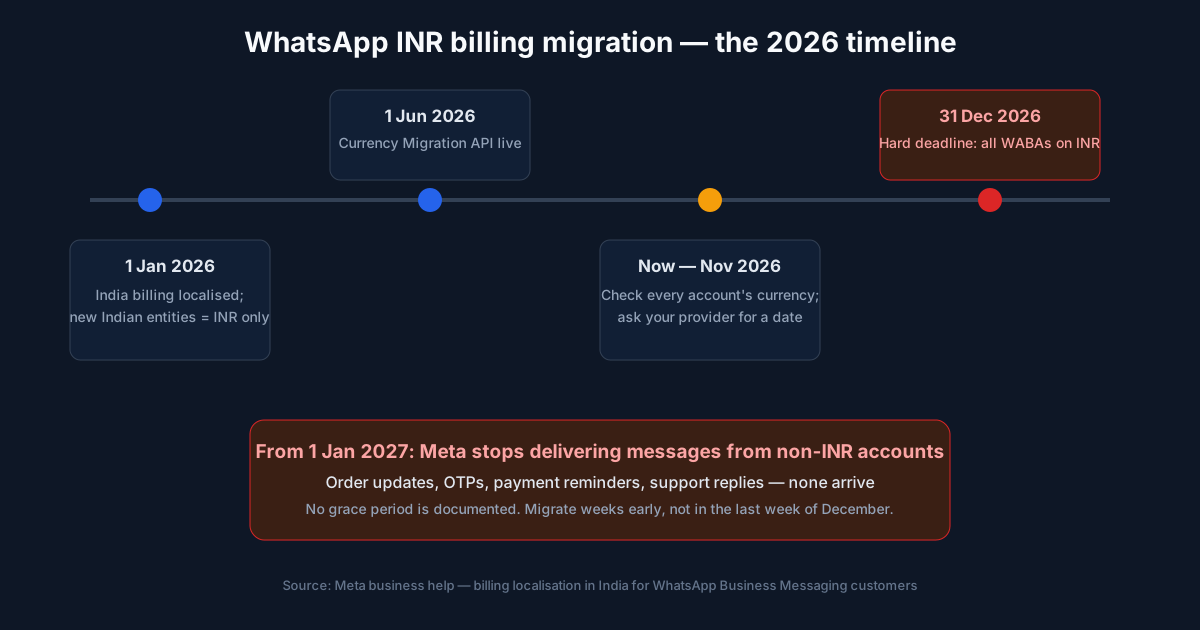
If your business sends OTPs, order updates or support replies through the WhatsApp Business API, there is a calendar date that matters more than any rate card right now: 31 December 2026. Meta is localising WhatsApp billing for India, and accounts still billed in another currency stop delivering messages on 1 January 2027. This guide explains who the deadline covers, what the migration actually does to your account, and the checklist to get through it without a single day of dead air.
Meta requires businesses billed in India to move every WhatsApp Business account to INR billing by 31 December 2026. From 1 January 2027, Meta stops delivering messages from non-INR accounts. Migration creates a new INR account, moves your numbers and templates across, and changes template IDs — so check your currency now and finish well before December ends.
This is not a pricing story. We already covered what the October 2026 charge change did to support bills and how the full WhatsApp API rate card works in India. The INR deadline is different: miss it and the question is not what a message costs, it is whether the message arrives at all. We build WhatsApp automation and AI support agents for clinics, D2C brands and service businesses across India, and this deadline sits on top of every integration we maintain. Here is how it works and how to get through it.
What the 31 December 2026 Deadline Actually Says
Meta’s business help centre spells it out under billing localisation for India: eligible customers must ensure all messaging accounts in their business portfolio are migrated to INR by 31 December 2026, since as of 1 January 2027, Meta will no longer deliver the messages of non-INR accounts.
Three words in that sentence decide everything. Eligible means customers whose Sold-To country is India in Meta’s Billing Hub — solution providers and businesses integrated directly with Meta. Portfolio means every messaging account your business owns, not just the one your team actively uses. And no longer deliver is exactly what it sounds like: the account still exists, your templates still pass review, but nothing reaches a customer.
Meta can change rates only on quarterly dates, and the next one is 1 January 2027 — the same day delivery stops for unmigrated accounts. Budget planning for Q1 2027 should assume both events land together.
Who Must Migrate — and Who Is Already Fine
The rule follows who Meta bills, not who your customers are. Work through this in order:
| Your situation | What the deadline means for you |
|---|---|
| Billed by Meta in India, account already on INR | Nothing to do. INR accounts have been invoiced from Facebook India since early 2026. |
| Billed by Meta in India, account on USD or another currency | You must migrate by 31 December 2026 or delivery stops on 1 January 2027. |
| On a provider (Wati, AiSensy, Interakt, MSG91 and similar) | The provider may be Meta’s customer, or your account may sit in your own Billing Hub. Ask which. Get their cutover date in writing either way. |
| New Indian entity setting up WhatsApp now | Already moot. Since 1 January 2026, entities whose Sold-To country is India can only create accounts in INR. |
| Using the free WhatsApp Business app | Not affected. The app has no Meta billing, so there is nothing to migrate. |
One trap worth naming: businesses with more than one number often migrate the busy one and forget an old account still sending OTPs or delivery updates from a corner of the company. Meta’s wording covers the whole portfolio. An account nobody logged into for a year still counts.
What the Migration Actually Does to Your Account
This is the part that surprises people. Migration is not a setting you flip in Billing & payments. It creates a new WhatsApp Business account billed in INR, copies your phone numbers, templates and Flows into it, and then retires the old one. Per Meta’s documentation on changing billing currency, three consequences follow:
- Template IDs change. Migrated templates keep their names but get new IDs on the new account. Anything that stores a template ID — a bot, an integration, a CRM mapping — breaks the moment you switch. Integrations that look templates up by name carry on working.
- The old account stops sending. Once the migration completes, the old account can no longer send messages. There is no running both in parallel to “see which works.”
- Some accounts cannot migrate through the API. Coexistence and authorised-agent accounts are excluded from the Currency Migration API. If yours is one of them, you need Meta support or your provider involved early — not on 28 December.
Two smaller notes. Lines of credit are denominated in USD regardless, so a credit line does not change currency — it gets attached to the new account. And the new account needs a working payment method before Meta will deliver template messages from it, so check Billing & payments immediately after the switch, not the day before a festival campaign.
How to Check Your Billing Currency Today
Five minutes now beats a stalled campaign in January. The currency shows in Meta Business Suite:
- Open Meta Business Suite and go to Settings.
- Under Accounts, choose WhatsApp accounts.
- Select the account you actually send messages from.
- On the Summary tab, look for Currency under business information.
- Repeat for every account in your portfolio, including the dormant ones.
If it says INR, done. If it shows another currency, the clock is running. And if it shows no currency found, that means no billing is set up on the account — it is not a quiet way of saying INR. Attach a payment method and confirm what the account is billed in before assuming you are safe.
The Pre-Migration Checklist
When we handle a currency migration for a client, this is the sequence. It assumes the account is eligible for the API migration; the excluded cases above need a different route.
| When | What to finish | Why it matters |
|---|---|---|
| Mid-November | Check currency on every account; confirm who Meta bills; ask your provider for a cutover date | Providers are running many migrations at once. Late requests queue. |
| End of November | List every integration that stores template IDs; export message history and reports you need | After migration the old account is read-only at best. Export first. |
| Early December | Run the migration at a quiet hour; verify the new account sends a test message of each template | The old account stops sending immediately. Pick an hour that is not your peak. |
| Before 20 December | Update stored template IDs; attach a payment method to the new account; confirm invoices arrive from Facebook India | A template send without a payment method gets refused by Meta. |
| Last ten days | Buffer only. Re-test if anything changed; monitor the first automated sends daily | Support queues across the ecosystem are worst in the final week. |
The one line I would underline from our own experience building WhatsApp flows: template names survive, template IDs do not. If your integration was built to look templates up by name, migration is a non-event. If someone hardcoded IDs two years ago, budget an hour to fix it — before the switch, not after your OTPs go dark.
What INR Invoices Change for Your Accounts Team
For businesses already on INR billing, Meta’s charges arrive as invoices from Facebook India, with GST applied — the same 18% that was already being added under the earlier arrangement. The practical difference is paperwork: an Indian invoice from an Indian entity usually sits better with your CA than a foreign-currency card charge, and reconciling WhatsApp spend against your rate card in rupees stops the monthly forex conversion guesswork.
Do not take tax treatment on faith from a blog post, including this one. Have your accountant confirm how the Facebook India invoice should be booked and what input credit applies to your setup. That is a two-line email in November; in April it becomes a reconciliation problem.
Common Mistakes That Cost Businesses Delivery Time
- Waiting for the provider to “handle it.” Some do, well. Some send a template email in mid-December. The cost of asking for a written cutover date is one message.
- Migrating on 30 December. The migration is quick when nothing goes wrong. When something does — an excluded account, a stuck payment method — you have no room to fix it before delivery stops.
- Testing with a marketing template only. Test every template type your business sends: utility, authentication, marketing. A broken OTP template is a worse January than a broken broadcast.
- Ignoring the dormant account. Portfolio means portfolio. One non-INR account that still sends weekly payment reminders will fail those sends.
- Confusing “no currency” with INR. An account with no billing set up is not migrated; it is unbilled, and Meta refuses template sends from accounts without a working payment method.
Frequently Asked Questions
What is the WhatsApp INR billing deadline for Indian businesses?
31 December 2026. Meta requires eligible customers — businesses whose Sold-To country is India in its Billing Hub — to have every WhatsApp Business account in their portfolio billed in INR by that date. From 1 January 2027, Meta stops delivering messages from accounts that have not migrated.
What happens if my account is still on USD billing after the deadline?
Messages stop being delivered from 1 January 2027. That means order confirmations, OTPs, payment reminders and support replies all fail silently. Meta’s documentation mentions no grace period, so plan to finish the migration weeks before the deadline, not in the last week of December.
Do I need to migrate if a provider like Wati or AiSensy runs my account?
It depends on whose Billing Hub the account sits in. If your provider is the customer Meta bills, the deadline is theirs to meet — ask them for a cutover date in writing. If your business connects to Meta directly and is billed by Meta in India, the responsibility is yours.
Will my phone number and templates survive the migration?
Your phone numbers, templates and Flows move to a new INR-billed account, but migrated templates get new IDs, and the old account can no longer send messages afterwards. Anything that stores template IDs — an integration, a bot, a spreadsheet of message codes — needs updating right after the switch.
How do I check which currency my WhatsApp account is billed in?
Open Meta Business Suite, go to Settings, choose WhatsApp accounts under Accounts, select the account you send from, and look for Currency on the Summary tab. INR means you are done. If it shows no currency at all, billing is not set up — that is not the same as being on INR.
Does the free WhatsApp Business app need this migration?
No. The migration applies only to the WhatsApp Business Platform (the API), used directly or through a provider. The free app on a single phone has no Meta billing attached, so there is nothing to move. If you are unsure which one you use, see our guide on the WhatsApp Business app vs API.
Not sure what your account is billed in?
We build and maintain WhatsApp automation for businesses across India — flows, AI reply agents, and the integrations this migration can break. We will check your setup and tell you plainly whether you need to act.
Get your WhatsApp setup checked See our AI & automation servicesSources: Meta’s business help page on billing localisation in India for WhatsApp Business Messaging customers and Meta’s developer documentation on changing your billing currency, checked in November 2026.
Related reading: what the October 2026 support cost change means for your bill, the full WhatsApp Business API pricing guide for India, how WhatsApp AI customer support fits into this billing model, and WhatsApp Business app vs API in India.