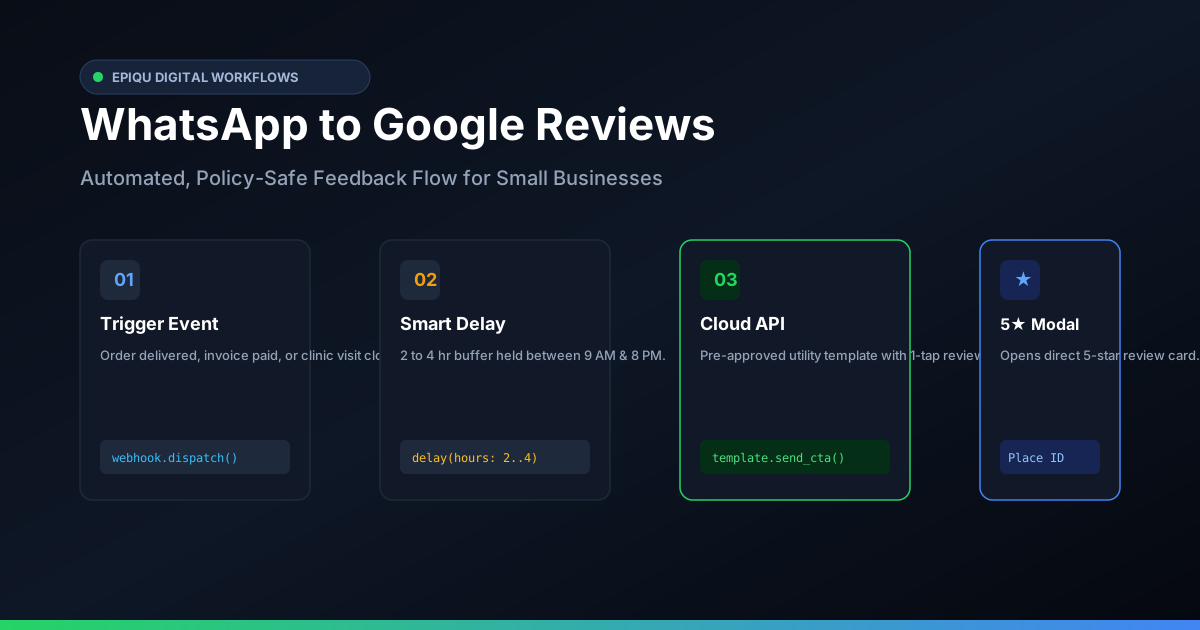
To automate Google review requests on WhatsApp safely, trigger a pre-approved WhatsApp Business template 2 to 4 hours after service completion. Use your direct Google Place ID review link (https://search.google.com/local/writereview?placeid=...), keep the message neutral, and never filter or gate negative reviewers, which violates Google’s terms.
Why Email and SMS Review Requests Fail in India
Most local businesses in India that set up automated review collection rely on automated SMS or transactional emails sent by their billing POS. The results are predictably dismal: promotional SMS clickthrough rates in India average less than 3% due to carrier DND filters and spam folders, while customer email open rates rarely exceed 15%.
WhatsApp flips those economics. With open rates exceeding 90% and median response times under 15 minutes, WhatsApp is where your customers actually read messages. However, broadcasting review links manually from personal phones leads to account bans, while sloppy automation violates Google Business Profile policies. Here is how we build this pipeline the right way.
How to Generate the Direct 1-Tap Google Review Link
Never send customers a generic Google Maps link or ask them to "search for our clinic on Google and leave a review". Every additional step cuts review completion rates in half. You need the direct Place ID link that opens Google’s review modal immediately with the 5-star selector active.
- Find your Google Place ID using Google’s Place ID Finder tool or from your Google Business Profile dashboard.
- Construct the direct modal link using this format:
https://search.google.com/local/writereview?placeid=YOUR_PLACE_ID. - Test the link in an incognito mobile browser. It must open directly to the review submission card without requiring the customer to find a "Write a Review" tab.
Channel Comparison: Where Do Review Requests Actually Convert?
| Channel | Average Open Rate | Action / Click Rate | Setup Overhead | Risk Factor |
|---|---|---|---|---|
| WhatsApp Cloud API | 92%–98% | 18%–32% | Medium (Webhook + Template) | Low (When following Meta template rules) |
| Transactional SMS | 15%–25% | 1.5%–4% | Low (DLT template required) | High DND drop-off in India |
| Transactional Email | 12%–20% | 2%–5% | Low (SMTP / Mailgun) | High spam/promotions filtering |
| Manual In-Person Prompt | 100% | 40%–50% | High (Staff time & inconsistency) | High churn when staff forgets |
The Google Policy Trap: Why Review Gating Will Cost You Your Profile
A common mistake agency software vendors make is "review gating". In a gated flow, the bot asks: "How was your visit? Reply 1 for Great, 2 for Bad." If the customer picks Great, the bot sends the Google review link. If the customer picks Bad, the bot routes them to an internal complaint form.
This explicitly violates Google Business Profile Terms of Service and FTC regulations. Google’s algorithm detects selective filtering patterns, and when flagged, Google systematically deletes all reviews associated with the profile or suspends the listing entirely. Your automated request must invite open, honest feedback and provide the same review link to everyone.
Five Rules for Safe WhatsApp Review Automation
- Smart timing delays: Send review requests 2 to 4 hours post-service for clinics and salons, or 24 hours post-delivery for retail. Never fire messages immediately at checkout or after 8 PM.
- Approved Meta Utility Template: Frame the message around the completed order or visit receipt rather than marketing hype to qualify for utility rates and fast approval.
- Zero review gating: Never pre-screen feedback. Provide the direct review link openly and include a separate line for urgent customer support.
- One-tap button CTA: Use WhatsApp Quick Reply or URL CTA buttons (e.g., Leave a Google Review) rather than raw unformatted links in message copy.
- Respect opt-outs: Honor stop keywords immediately. If a customer replies STOP, remove their number from automated triggers permanently.
Frequently Asked Questions
How much does WhatsApp review automation cost in India?
Operating costs comprise three parts: Meta WhatsApp Business API charges (approx ₹0.40 to ₹0.80 per utility or marketing conversation window; utility templates triggered by receipts or orders are significantly cheaper), webhook automation hosting (₹400 to ₹1,200/month on a VPS or serverless function), and your billing POS integration.
Can I automatically send a Google review link on WhatsApp?
Yes. By connecting your billing software, CRM, or POS to the WhatsApp Business Cloud API via webhooks, you can automatically send a pre-approved utility message with a direct 1-tap review link 2 to 4 hours after a customer transaction.
What is the direct Google review link formula?
Use the official Google review dialog URL: https://search.google.com/local/writereview?placeid=YOUR_PLACE_ID. This opens the Google review dialog directly with 5 empty stars, avoiding the need for customers to search your business name on Maps.
Is review gating allowed on Google?
No. Review gating—asking customers if they had a positive experience first and only sending positive responders to Google while diverting negative ones—violates Google Business Profile policies and FTC rules. You must give every customer an unfiltered path to review.
Which WhatsApp message template category should I use?
Submit your review request as a Utility template linked to a completed order, or as a Service follow-up message within the 24-hour customer service window. Avoid hype or discounts to prevent Meta reclassifying it as a higher-priced Marketing template.
Looking to build high-converting local search presence or automated customer workflows? Explore our digital marketing services, see our custom messaging & AI automation solutions, browse our regional coverage across Tamil Nadu location hubs, or consult the Epiqu technical team.